

Body and paint
Dents, scratches, rust, cracked glass, missing parts, panel misalignment and faded or oxidized paint.
Car damage check
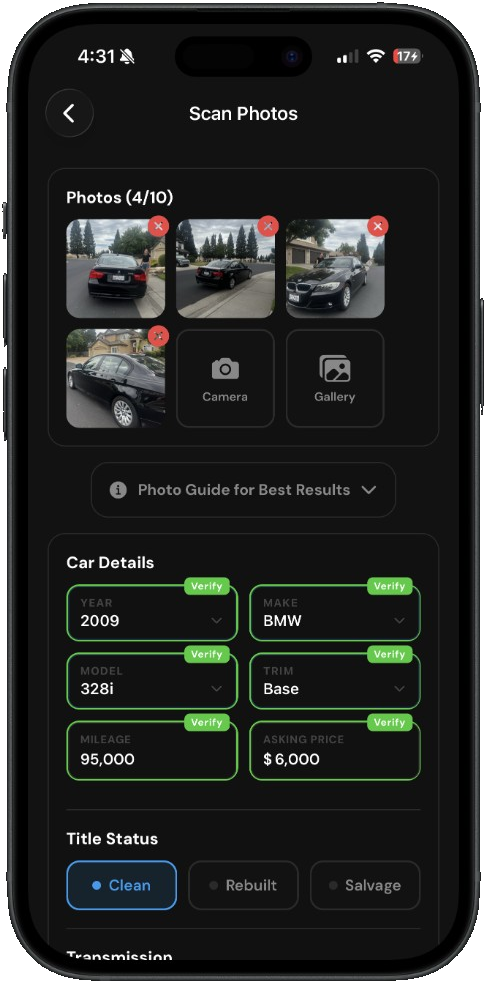
Take up to 10 photos of the car, in person or from the listing. AutoGauge looks for dents, rust, worn tires, interior wear and signs of accident repair, and gives the car a condition score.


3-day free trial · iPhone and Android

Things that are easy to miss in a quick walk-around.
Dents, scratches, rust, cracked glass, missing parts, panel misalignment and faded or oxidized paint.
Uneven panel gaps and other signs of past repair, plus aftermarket modifications.
Tread depth, uneven wear, tire brand and age, and curb rash on the wheels.
Torn or stained seats, dash cracks, a sagging headliner and yellowed headlights.
The scan reads the car from the photos, then rates what it can see.
| Result | What it shows |
|---|---|
| Condition score | A score with a rating of excellent, good, fair or poor, based on what’s visible in the photos. |
| Notes by area | Separate notes for the exterior, interior, mechanical and tires. |
| Car details | Year, make, model, trim, mileage and title status filled in from the photos where readable. You confirm them before scanning. |
| Photo coverage | Tells you which angles are missing so nothing is skipped. |
| Dash warning lights | Add a photo of the gauge cluster and any warning lights are named, with what they mean for that car. |
| Value and deal score | The same value, deal score, problems and recalls as a listing scan. |

It can spot visible signs, like uneven panel gaps, mismatched paint and replaced parts. It can’t see frame damage or hidden repairs, so pair it with a vehicle history report and an in-person inspection.
Up to 10. Cover all four sides, the interior, the odometer, the tires and the engine bay, plus any damage you see.
Yes. Screenshots or saved listing photos work. Photos you take in person usually show more.
It’s a rating of what’s visible in the photos, with notes for the exterior, interior, mechanical and tires. It doesn’t include anything the photos can’t show.
AutoGauge is free to download, and the Unlimited plan starts with a 3-day free trial. You can also buy a scan pack instead of subscribing. The Chrome extension gives new users one free scan.
AutoGauge is a research tool, not a replacement for a pre-purchase inspection. AutoGauge is not affiliated with Facebook or Meta.